A review by Vose Software, the makers of ModelChoice
Top 7 Decision Analysis Tools
Decision tree software compared on 29 criteria, with prices, screenshots, documentation links and what users say.
The short answer
For decision trees in Excel with value of information built in, ModelChoice, our own product, at most €950 a year. For health economics, TreeAge Pro. For very large problems, DPL or Analytica. To learn, or to sketch a first tree at no cost, SilverDecisions. PrecisionTree is now sold only inside Lumivero’s DecisionTools Suite.
Last updated October 2026. Features checked against each vendor’s own material in August 2026; prices re-checked on the vendors’ websites in October 2026.
What these tools doEach one rolls a decision tree back to find the best choice. Move the slider to see when that choice flips.
Launching is worth $0.75m on average, against $0 for not launching. Best choice: Launch.
The best choice flips when the chance falls below one in three. Finding that point, and pricing the study that would settle it, is what separates these tools. Tree drawn the way ModelChoice draws one.
The seven tools at a glance
Pick what you need and the cards show which tools have it. They are in the order we review them, starting with our own.
Show me the tools with:
Pick one or more to narrow the list.
Our product
ModelChoice
Vose Software · Excel add-in
Best for: Decision trees in Excel, with value of information, robustness and a one-page Decision Brief
Prices are list prices for one user from each vendor’s website, retrieved October 2026, before discounts; ModelChoice from our price list. Each review links the vendor’s price page.
The basics
What is decision analysis software?
It helps you choose between options when the outcome is uncertain, and then tells you how much to trust that choice.
It draws the choice as a decision tree or an influence diagram, attaches probabilities and payoffs to the branches, and works backwards to find the option with the best expected value. That step is called rollback. Then comes the part that matters more: testing how sensitive the recommendation is to the assumptions behind it.
The category is small, and older than the Monte Carlo simulation market beside it. Several products publish no price, a long-established one can no longer be bought on its own, and the whole field has fewer than fifty public software reviews. This comparison tries to close that gap.
How we compared. Every feature cell is backed by the vendor’s own material: product pages, help indexes, manuals and issue trackers, read in August 2026 and linked from each review. Prices were re-checked in October 2026.
Where we couldn’t find a feature documented, the table says “not documented” rather than “no”. ModelChoice is our product, and we held it to the same standard, including the rows where it loses.
This page
A decision tree in decision analysis
A model of a choice: what you could do, what might happen next, and what each ending is worth. Every tool below works with this kind.
Not this page
A decision tree in machine learning
A classifier that learns rules from data to predict a label. Same name, same shape, different job. None of the tools below do this.
Side by side
The full comparison: 29 criteria
Each cell comes from the vendor’s own documentation. A cross means the vendor’s material confirms the gap; a dash means we found nothing either way.
Yes Yes, with a condition in the note No— Not documented
The seven decision analysis tools compared on 29 criteria, in four groups.
influence diagrams instead; trees are a hand-built exercise
Influence diagrams
linked to the tree view
the core paradigm
—not documented
Model lives on the Excel worksheet
standalone; links to Excel
Excel data import and export only
plain Excel formulas
browser app
Markov or state-transition models
absent from feature list and help
no entries in the vendor’s help index
buildable with Dynamic(); no dedicated feature
first-class, with video tutorials
Monte Carlo simulation
through ModelRisk, on the same tree
via @RISK, bundled in the same suite
native
native throughout
PSA and microsimulation
SimVoi, a separate add-in
probabilistic sensitivity analysis only
Bayesian revision of probabilities
performed inside the EVII analysis
one-click node reversal
help: “Bayesian Revision”
—not documented
—not documented
—not documented
—not documented
Multi-criteria decision analysis
with AHP weight elicitation
—not documented
multiple attributes and objectives
—modelled by hand
cost-effectiveness (two objectives)
—not documented
manual chapter 8
Risk-preference utility rollback
exponential, log, square-root, linear
with risk tolerance
—not documented
—its “utilities” are health-state values, a different concept
risk-utility rollback
—not documented
Analysis and reporting
Rollback with optimal-policy report
policy plus one-page Decision Brief
policy suggestion
graphic and text policy trees
compare alternatives; optimisation needs the Optimizer edition
rollback formulas on the sheet
optimal path highlighted
Risk profile of each strategy
plus risk/reward charts
distribution views on any result
via SimVoi charts
—not documented
One-way sensitivity
rainbow diagrams
SensIt
N-way module
Two-way sensitivity
two-way rainbow diagram
—not documented
plus three-way
SensIt
N-way module
Tornado charts
with spider charts
a family of eleven help topics
documented workflow, not one click
SensIt
with spider plots
Threshold or break-even search
robustness score per assumption
strategy-region charts
policy changes marked on rainbow diagrams
—not documented
with a written explanation of the flip
—not documented
—not documented
Value of information
EVPI and EVII from the tree
no documented feature; taught as a hand-built webinar exercise
perfect information and control, all editions
add-on library you import
EVPI and EVPPI, from PSA
SimVoi, by simulation
open request since 2016
Scenario analysis
—not documented
scenario risk profiles
WhatIf and WhatIfAll functions
—not documented
—not documented
—not documented
Platform and interoperability
Windows desktop
browser app, any operating system
macOS
Big Sur or later, Intel and Apple silicon
Mac Excel 2019–365
browser
Runs in a browser
ACP cloud platform, separate product
TreeAge Pro Web, separate product
Model opens without a licence
ordinary workbook
the workbook opens in Excel; analyses need the add-in
no free reader found
free edition runs any existing model
free viewer, never expires
plain formulas recalculate without the add-in
share by URL
Works with Excel data
it is Excel
it is Excel
links, plus spreadsheet-to-model conversion
spreadsheet read and write functions
import and export
it is Excel
manual entry; JSON files
Automation or programmatic access
API for Python, .NET and VBA; MCP server for AI assistants
—not documented
—not documented
ADE engine, separate product
—not documented
—not documented
open source, LGPL v3
Licensing, learning and support
Published list price
€950 per user per year
suite only: €3,680–€4,790 a year
$1,495–$8,995 perpetual
$1,000–$4,000 per user per year
$760–$660 a year; perpetual extra
$59–$179 one-time
free
Perpetual licence option
annual licence
annual in the shop
subscription only
one-time purchase
n/a: free
Trial
15 days, fully functional
15-day suite trial
trial licence via request form
free edition, no expiry
14 days, 25 nodes, no save or print
none; 30-day refund instead
n/a: free
Student or academic terms
—not published
—not published
—not published
free edition covers small models
barred from commercially funded work
student $3–$17; bundled with 60 textbooks
free for everyone
Public web documentation
in-product, seven languages; web manual not yet published
current help ships as a downloadable CHM file only
public PDF user guides plus a full help index
documentation wiki
web help portals
public PDF guides
wiki manual plus a free 2022 book
Video tutorials
not yet
five videos, about 23 minutes
product videos; training is instructor-led
webinars and demos rather than step-by-step
eight tutorial series
—not documented
—not documented
Reviews on G2 and Capterra
none yet (released 2026)
5 reviews
3 reviews
37 reviews
3 reviews
none found
none found
Sources: each vendor’s product pages, help, manuals and price pages, linked in the reviews below. Features read in August 2026; prices retrieved October 2026. Review counts: G2 and Capterra, August 2026.
Want to check the ModelChoice column yourself?The 15-day trial is fully functional and comes with 59 example models.
What each tool is, what it costs, what users say and where it falls short, with links to its documentation. The numbers are for finding your way, not a ranking.
1
ModelChoice
Vose Software · Excel add-in
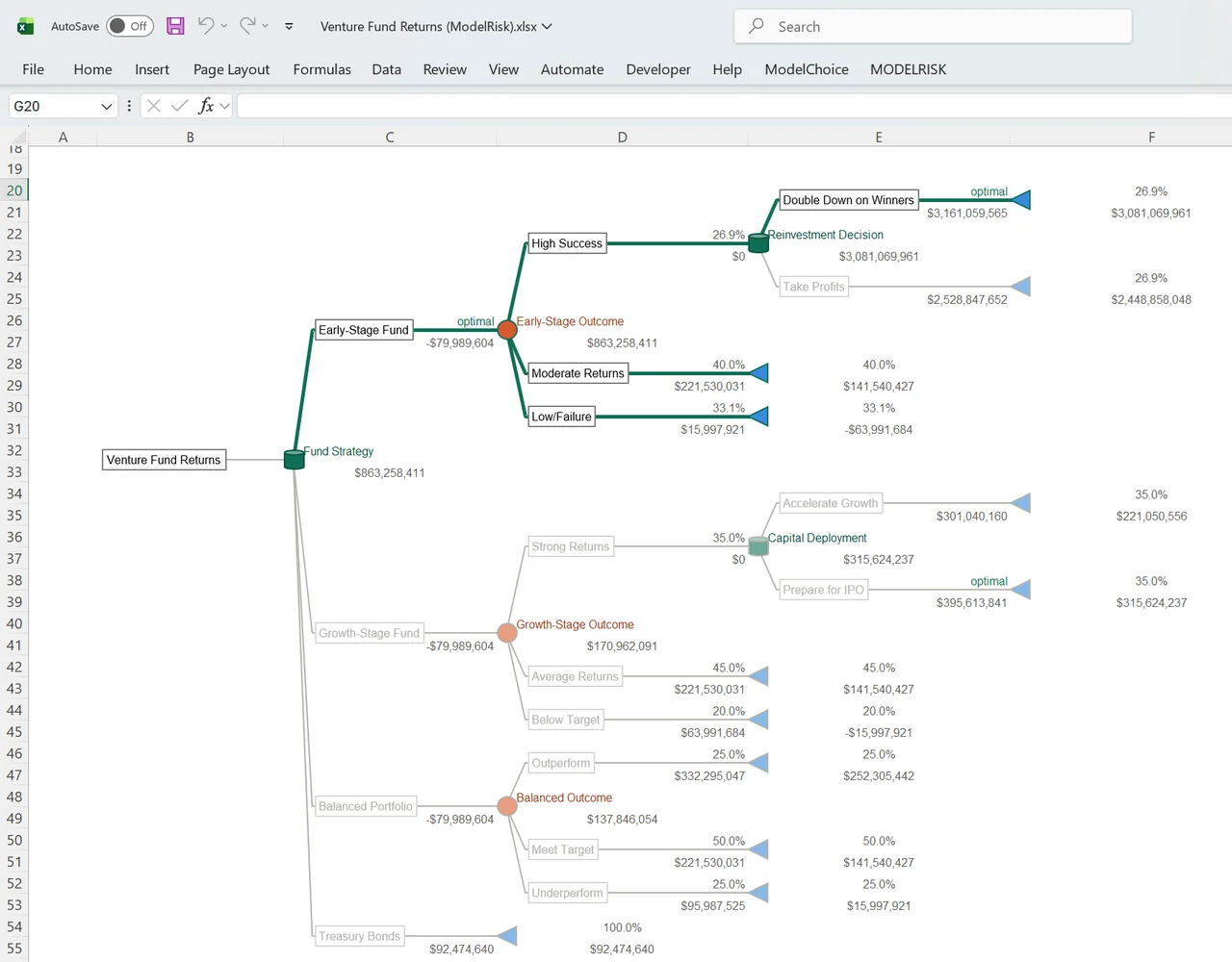
A venture fund decision in ModelChoice, rolled back on the worksheet, with the optimal path in bold green. Screenshot of ModelChoice in Excel, October 2026.
ModelChoice is our own product, so read this section with that in mind. It draws decision trees on an Excel worksheet, rolls them back as you type and highlights the optimal path. The model stays an ordinary workbook, so a colleague, an auditor or a client can open it and follow the logic without buying anything.
From the same tree it runs the risk profile, one-way and two-way sensitivity, and a robustness score that tells you how far each assumption can move before the recommendation flips. It prices a study before you commission it (EVPI and EVII), scores options on several criteria with AHP weights, and writes a one-page Decision Brief.
When a branch is really a range, such as a price, a demand or a duration, it becomes a distribution and the tree runs Monte Carlo simulation through ModelRisk. An MCP server lets an AI assistant build, audit and analyse the tree.
What users say
Nothing yet, and we won’t pretend otherwise. ModelChoice was released in 2026 and has no third-party reviews so far. Judge it on the free trial.
Limitations
Windows and Excel only, with no Mac or browser version. There are no Markov models and no influence-diagram view. Bayesian updating happens inside the EVII analysis, not as a separate tree-reversal view like PrecisionTree’s. The full manual is in the product, in seven languages, and not yet on the web.
If your decision problem doesn’t live near a spreadsheet, such as a large influence diagram with hundreds of variables, a standalone tool like DPL or Analytica fits better than an add-in.
2
PrecisionTree
Lumivero · Excel add-in
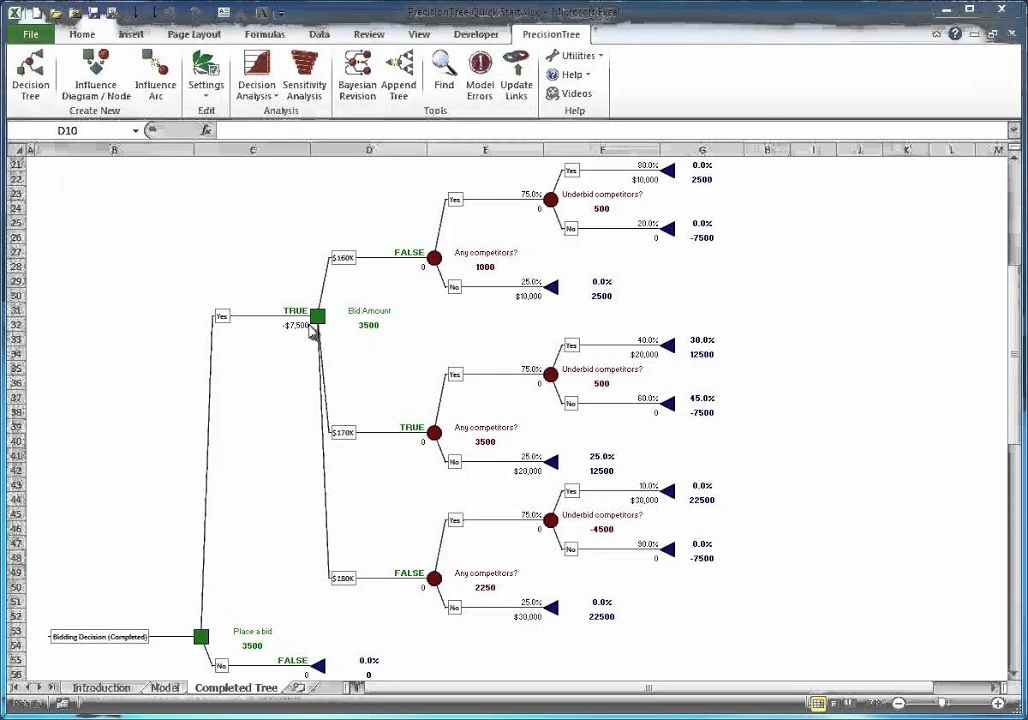
A bidding decision rolled back in PrecisionTree: TRUE marks the best choices, to place a bid and to bid $170K. Image: Lumivero, from PrecisionTree’s Quick Start example.
PrecisionTree is a long-established decision tree add-in for Excel: people were already reviewing it in 1996. It builds trees and influence diagrams on the worksheet and rolls them back. Its reports include risk profiles, policy suggestions, decision tables, two-way sensitivity, tornado and spider charts, Bayesian revision and utility functions.
The thing to know before you shortlist it: you can’t buy it on its own. Lumivero’s web shop lists it only as part of the DecisionTools Suite, with @RISK, StatTools, NeuralTools and Evolver, at €3,680 a year for Professional or €4,790 for Industrial (shop.lumivero.com, retrieved October 2026).
If you want the simulation engine too, that can be good value. If you only wanted decision trees, you are buying five products to get one.
On value of information, be precise. PrecisionTree’s documentation describes no such feature. Its help site has pages on sensitivity analysis, policy suggestions and decision tables. But search it for “value of information”, “EVPI” or “perfect information” and you find nothing.
What Lumivero offers instead is a webinar, Introduction to Decision Analysis Using PrecisionTree: Measuring the Value of Information, that shows how to build the comparison by hand as a second tree. The technique works. It just isn’t a report from the tree you already have.
What users say
The public record is small: five reviews across G2 and Capterra, rating the suite 4.6 and 5 out of 5. Two themes repeat.
“One of the best things about this suite is it’s ability to perform complex simulations. It is also incredibly easy to use.”
“The price is a little too high and the evaluation period is too little.”
“Students loved the software… practical tools that can be used to solve real life problems”, though “setting up the problems for sensitivity analysis is the most difficult part for students.”
Limitations
Windows only, and the Professional edition caps trees at 1,000 nodes. The suite is actively maintained (release 8.12 shipped in November 2025), but PrecisionTree’s own version history, in the same help set, records no release after 7.6.1 in September 2019.
The current help ships as a downloadable Windows CHM file rather than web pages, and Lumivero’s download page warns that Windows blocks CHM files by default. Weighing a replacement? Our PrecisionTree alternative guide covers prices, one-click model import and the switch.
3
DPL
Syncopation Software · Standalone application
One model, two views: decision tree and influence diagram in DPL. Image: Syncopation Software, syncopation.com, retrieved August 2026.
DPL, from Syncopation Software, is a standalone decision analysis application built for large, formally structured problems. Its signature is the dual view above: the same model as a compact influence diagram and as the decision tree it implies.
It computes value of information and value of control in every edition, does Bayesian revision, and draws one-way and two-way “rainbow” diagrams that mark where the optimal policy changes. Its tornado analysis runs to eleven help topics. It links to spreadsheets, and can convert a spreadsheet model to its own language for speed, but the model itself lives outside Excel.
Price: $1,495 for a perpetual Professional licence and $1,995 for Enterprise (syncopation.com order page, retrieved October 2026). Two things are easy to miss. Portfolio analysis is a separate product at $8,995. And the licence includes 60 days of support; after that, maintenance runs from $295 to $1,795 a year, depending on the edition.
What users say
Three G2 reviews, averaging 4.0 out of 5, all from 2024, and they agree with each other.
“Influence Diagrams for visually modelling decision”
“High initial cost limits small organization access”
“Outdated and old looking user interface makes it difficult.”
A consulting partner of the vendor calls it “industrial grade because it can use trees with hundreds of millions of end nodes”. Allowing for the source, that matches the feature set: this is a tool for very large decision problems.
Limitations
Windows only, with no Mac version. There are no Markov models: the vendor’s own help index has no entry for them. Training is instructor-led only, with no self-paced course.
We found no free reader or viewer, so anyone who needs to check your model needs a licence of their own. For a model that a client, a regulator or an auditor will review, that is a real constraint.
4
Analytica
Lumina Decision Systems · Standalone, plus browser
An influence diagram of a rent-or-buy model in Analytica. Image: Lumina Decision Systems, Analytica documentation wiki (“Creating Lucid Influence Diagrams”), retrieved August 2026.
Analytica takes a different route: influence diagrams rather than trees, with hierarchical models you can expand and collapse. For large problems with many linked variables, that scales much better than a tree, which grows exponentially with every node you add.
It handles uncertainty with Monte Carlo simulation throughout and reads and writes Excel through built-in spreadsheet functions. Version 7.0 shipped in January 2026, so it is actively developed.
The trade-off is the paradigm itself. Decision trees aren’t native: the vendor’s documentation says Analytica “uses an influence diagram paradigm instead”, and trees must be encoded by hand.
One feature is easy to overlook: the free edition has no time limit and opens and runs existing models of any size. The cap of about 100 objects applies to models you create, not models you read. So a reviewer can download it and open your model for free.
Price: free; $1,000 per user per year for Professional; $2,000 for Developer; $4,000 for Optimizer (analytica.com pricing plans, retrieved October 2026). Subscription only: no perpetual option is listed.
What users say
Analytica has the largest review base here, 33 reviews on G2 at 4.8 out of 5 and four on Capterra at 5 out of 5. The pattern is consistent: enthusiasm for the modelling approach, irritation at the packaging.
“Models of similar complexity require anywhere from 1/4 to 1/2 the amount of time to build.”
“The user interface is starting to look dated”
“Not available for MACs”
“Optimization function requires more expensive version”
Limitations
Value of information exists, but as a downloadable library you import and call as functions, not a command in the interface. Tornado charts are also a documented workflow rather than a one-click report.
Finding the optimal decision, rather than comparing alternatives you set up yourself, needs the Optimizer edition at $4,000. Influence diagrams take real learning. And the model isn’t a spreadsheet, so people who review spreadsheets can’t review it.
5
TreeAge Pro
TreeAge Software · Standalone application
A Markov model in TreeAge Pro, with per-state costs, utilities and event probabilities. Image: TreeAge Software, treeage.com, retrieved August 2026.
TreeAge Pro is built for health economics. If you are building a cost-effectiveness model, a Markov model of disease progression, or anything headed for a health technology assessment, it is the tool reviewers in that field will expect.
It treats Markov models, microsimulation, partitioned survival analysis and probabilistic sensitivity analysis as core features, each with its own video tutorials. It also computes EVPI and EVPPI. That matters in a field where people really do ask “is another trial worth funding?”
Note how it gets to value of information: TreeAge derives EVPI from a probabilistic sensitivity analysis run at a decision node, rather than directly from the tree. That suits the models it is built for, and is a heavier route for a simple business decision.
Its threshold analysis searches for the input value where the best strategy changes, then explains the change in words.
Price: Business is $660 a year or $2,000 perpetual; Healthcare is $760 a year or $2,300 perpetual. Both perpetual licences renew maintenance at $425 a year after the first year (treeage.com store, retrieved October 2026).
A free viewer that never expires lets anyone open your model. It is also one of only two paid tools here that run natively on a Mac (Big Sur or later, on Intel and Apple silicon).
What users say
The review sites hold only three reviews, averaging 3.5 out of 5. TreeAge is unusual in having a peer-reviewed literature, because health economists publish comparisons of their own tools.
“Does not require a very steep learning curve, menu driven options and manuals make it easy”
“You cannot use it for publications”
“The efficiency and transparency advantages of programming languages such as MATLAB and R become increasingly valuable when more complex analyses are required.”
“A basic problem is the price of the TreeAge software, and the need to renew annually the license… which, in the medium to long term, results in an amount that may seem excessive.”
Limitations
The trial is hard to evaluate in: 14 days, at most 25 nodes, and you can’t save or print. Academic and non-profit licences are contractually barred from “commercially funded projects of any kind”, which catches more people than you might expect.
Outside healthcare it is a much less obvious choice. And its knowledge base has stale corners: the article that tells you where to find tutorials points to a demos page that no longer exists.
6
TreePlan, SensIt and SimVoi
TreePlan Software · Three Excel add-ins
A TreePlan decision tree built on an Excel worksheet. Image: TreePlan Software, treeplan.com, retrieved August 2026.
Mike Middleton’s three Excel add-ins are widely used in teaching. TreePlan builds and rolls back trees, SensIt does one-way and two-way sensitivity with tornado and spider charts, and SimVoi runs simulation and computes value of information.
They are inexpensive and run on Mac as well as Windows Excel, which in this comparison only TreeAge and the browser-based SilverDecisions can also say. TreePlan was last updated in May 2025.
Its distinguishing habit: TreePlan writes the rollback as plain Excel formulas on the sheet. Nothing is hidden in the add-in, so the finished model recalculates for anyone who opens the workbook, with no licence, and an auditor can trace every cell.
The price of that transparency is that the analyses stay simple. Sensitivity comes from Excel data tables through SensIt, and SimVoi computes value of information by simulation on spreadsheet models. The vendor’s own descriptions never use the terms EVPI or EVII.
Price: $59 each for TreePlan and SensIt, $79 for SimVoi, or $179 for the Decision Analysis Toolkit with all three (treeplan.com, retrieved October 2026). Trees and sensitivity and value of information means the $179 toolkit, not the $59 starting price.
What users say
There are no G2 or Capterra reviews to quote. The record here is a different kind of evidence: the vendor lists sixty textbook editions licensed to bundle the student version, including management-science texts by Anderson and Sweeney, Taylor, Ragsdale and Balakrishnan, and business schools such as Kellogg and Tuck use it in course material.
Limitations
Three separate products that don’t share a model. There is no trial, only a 30-day money-back guarantee you claim by email, and student licences may not be used commercially. For teaching, and for problems that are genuinely small, it is very good value.
7
SilverDecisions
Warsaw School of Economics · Browser, open source
Our worked catalyst-retrofit example, rebuilt in the free SilverDecisions browser app in August 2026. It is the same decision we analyse step by step in our value of information article.
SilverDecisions is a free, open-source decision tree program from the Warsaw School of Economics. It runs entirely in a web browser: nothing to install, no account, no cost.
It draws decision trees, rolls them back under six selectable rules, runs sensitivity analysis with tornado diagrams and spider plots, and offers multi-criteria comparison. A finished model can be shared as a link, editable or read-only, or exported to PNG, SVG, PDF and JSON.
Its academic record is solid. Its sensitivity method appeared in a peer-reviewed paper (Kamiński, Jakubczyk and Szufel, Central European Journal of Operations Research, 2017). In 2022 the team also published a free 250-page book, Modeling Decisions with SilverDecisions.
When do you outgrow it? The day you need value of information, Monte Carlo on the tree’s payoffs, or a model your colleagues can open and audit in the spreadsheet they already use. The comparison table shows which paid tools cover each.
What users say
There are no G2 or Capterra reviews. The visible user base is academic, with published papers crediting it for their tree figures.
Limitations
No value of information: that feature request has been open on the project’s issue tracker since December 2016. There is no general Monte Carlo engine either; the probabilistic option lives inside the sensitivity module, not on the tree’s payoffs.
It is academic software maintained on academic timescales, so support is what the community provides. But it costs nothing and is good at what it does: for teaching, a quick sketch, or seeing whether a decision tree helps before spending money, it is a sensible first stop.
Moving from PrecisionTree?ModelChoice imports PrecisionTree models in one click, so you can check your existing trees side by side.
Every product here is honest about its features. The surprises are in the packaging, and they are worth checking before you shortlist, not after.
The thing that is easy to miss, tool by tool
Tool
Easy to miss
PrecisionTree
Can’t be bought alone: you buy a five-product suite. Professional caps trees at 1,000 nodes. The current help is a downloadable CHM file that Windows blocks by default.
DPL
Portfolio analysis is a separate product at $8,995, against $1,495 for Professional. Only 60 days of support are included; maintenance is $295 to $1,795 a year after that.
Analytica
Subscription only, with no perpetual licence. Value of information needs a library import, and finding optimal decisions needs the Optimizer edition. Floating licences cost about 2.5 times an individual one.
TreeAge Pro
The trial is capped at 25 nodes and can’t save or print. Academic licences are barred from commercially funded work. Parts of the knowledge base point to pages that no longer exist.
TreePlan family
Three products, not one. Trees plus sensitivity plus value of information means the $179 toolkit. There is no trial: you buy first and can ask for a refund within 30 days.
SilverDecisions
No value of information (the request has been open since 2016), and simulation exists only inside the sensitivity module.
ModelChoice
Windows and Excel only, and new enough to have no third-party reviews. Full Monte Carlo simulation on the tree needs ModelRisk.
The evidence
The independent record: surveys, reviews and journals
This market is small, so it is worth knowing exactly what independent evidence exists, and how little of it there is.
The INFORMS survey hasn’t run since 2020. The OR/MS Today Decision Analysis Software Survey, the nearest thing this category has to a census, last appeared in December 2020. It covered 17 packages from 12 vendors, with all data supplied by the vendors.
Of the seven tools here, only DPL, SilverDecisions and the TreePlan family took part. Lumivero (then Palisade), Lumina and TreeAge didn’t appear, and no edition has been published since.
The review sites are nearly empty. The seven products have 48 reviews between them on G2 and Capterra, and many of the reviewers are academics rather than industrial analysts. In this category, star ratings can’t carry a purchase decision. Documentation you can read before buying, and a trial you can work in, tell you more.
Independent testing lives in journals. Health economists publish tests of their own tools. Hollman and colleagues (PharmacoEconomics, 2017) found Excel and TreeAge work well for teaching and standard health technology assessments. For complex analyses, they saw “efficiency and transparency advantages” in R and MATLAB.
A 2016 review of Markov software found free tools “are good alternatives to the relatively expensive TreeAge software”. SilverDecisions’ method is itself peer-reviewed. This work covers health care, not business decisions. But it is the only independent testing the category gets.
Public reviews on G2 and CapterraNumber of reviews per product, August 2026
Analytica37
PrecisionTree5
DPL3
TreeAge Pro3
ModelChoicenone yet: released in 20260
TreePlannone found0
SilverDecisionsnone found0
PrecisionTree’s reviews are of the DecisionTools Suite it is sold in. The quotes in each review above come from these pages.
Also worth a look
Four more worth knowing about
Tools that didn’t make the main comparison but solve related problems well.
GeNIe Modeler
BayesFusion
Builds influence diagrams with decision, utility and multi-attribute utility nodes, and computes value of information that ranks candidate tests. The academic version is free and business versions have a 30-day trial, but commercial prices aren’t published.
Finds optimal decisions from influence diagrams, with a free size-limited mode, and is inexpensive for the category. It runs natively on Windows only, and the vendor’s own two pages disagree on its price, so ask before you budget.
Web-based multi-criteria decision analysis using the PAPRIKA method: the one to look at if your problem is ranking criteria rather than modelling uncertainty. It publishes its price, $25,000 a year for the full suite.
SmartOrg
SmartOrg
A hosted platform for R&D and innovation portfolios rather than single decisions. It publishes no prices; the route in is a demo request.
A warning about search results. Search for “decision tree software” and most of what you find are diagramming tools: they draw a tree well and calculate nothing. If a product doesn’t mention rollback, expected value or sensitivity analysis, it’s a drawing package.
How to choose
Four questions settle it faster than a feature list
Answer these, then build the same small model in your two finalists.
Does the model need to live in a spreadsheet?
If the data, the reviewers and the audit trail are already in Excel, an add-in keeps everything in one place and anyone can open the file. If the problem is large and structural, a standalone tool scales better.
Who has to be able to open it?
This is the question people ask too late. A model that a client or a regulator can’t open becomes a meeting. Excel-based tools, Analytica’s free edition, TreeAge’s viewer and SilverDecisions all pass; DPL doesn’t.
Do you need to price the information?
If you will ever be asked “should we do more work before deciding?”, you need value of information. The tools differ sharply in whether that is a report or a modelling exercise.
What does it cost at your real seat count?
Price the edition that has the features on your list, in year three, for the number of seats you expect, not the entry tier for one user in year one.
Then build the same small model in both finalists on trial licences, ideally a decision whose answer you already know. An afternoon spent that way tells you more than any comparison page, including this one.
Software that helps you choose between options when the outcome is uncertain. It models the choice as a decision tree or influence diagram, attaches probabilities and payoffs, works backwards to find the best expected value, and then tests how sensitive that recommendation is to its assumptions.
It is a different discipline from the decision trees used in machine learning, which classify data rather than compare choices.
How much does decision analysis software cost?
Published list prices run from free to several thousand a year. SilverDecisions is free; the TreePlan Decision Analysis Toolkit is $179 one-time; TreeAge Pro Business is $660 a year; Analytica Professional is $1,000 per user per year; and Lumivero’s DecisionTools Suite is €3,680 (Professional) to €4,790 (Industrial) a year. ModelChoice costs at most €950 per user per year. Prices retrieved October 2026.
Can I still buy PrecisionTree on its own?
Not according to Lumivero’s shop, which lists it only as a component of the DecisionTools Suite. Decision trees therefore come bundled with @RISK, StatTools, NeuralTools and Evolver, at €3,680 a year for Professional or €4,790 for Industrial (retrieved October 2026).
Which decision analysis tools calculate value of information?
Several do, in different places. DPL reports value of information and control in every edition. TreeAge Pro computes EVPI and EVPPI, but only from a probabilistic sensitivity analysis. Analytica offers it through an add-on library you import. SimVoi computes it on spreadsheet models.
ModelChoice computes EVPI and EVII directly from the decision tree as a standard report. PrecisionTree’s documentation describes no such feature, and SilverDecisions doesn’t have one.
Which decision analysis tools run on a Mac?
Three of the seven. TreeAge Pro runs natively on macOS Big Sur or later, on Intel and Apple silicon. The TreePlan family supports Mac Excel 2019 through 365. SilverDecisions runs in any browser, so the operating system doesn’t matter. ModelChoice, PrecisionTree, DPL and Analytica are Windows-only.
Where is each decision analysis tool documented?
DPL publishes its user guides as free PDFs and a complete help index on the web. Analytica keeps a public documentation wiki. TreeAge runs web help portals plus eight video tutorial series. TreePlan’s guides are free PDFs. SilverDecisions has a wiki manual and a free 250-page book.
PrecisionTree’s current help ships only as a downloadable Windows CHM file, a format Windows blocks by default. ModelChoice’s manual is in the product, in seven languages.
What is the best free decision tree software?
SilverDecisions, developed at the Warsaw School of Economics and released under LGPL v3. It runs in a browser, draws and rolls back trees, supports sensitivity analysis and multi-criteria comparison, and shares models by link or as JSON files. It doesn’t compute value of information: that feature request has been open since December 2016.
Do I need decision analysis software, or will a spreadsheet do?
You can draw a decision tree in a spreadsheet and work out its expected value by hand. What is hard by hand is everything after that: rebuilding the rollback when the structure changes, finding which assumption holds the recommendation up, working out how far it can move before the answer flips, and pricing the study that would settle it. That is the work these tools automate.
Can a colleague open my decision model without a licence?
It depends on the tool, so decide early. Excel-based tools keep the model in an ordinary workbook, and TreePlan writes the rollback as plain formulas that recalculate without the add-in. Analytica’s free edition runs existing models of any size, and TreeAge publishes a viewer that doesn’t expire. SilverDecisions shares by URL. For DPL we found no free reader, so a reviewer needs a licence.
Try ModelChoice on a decision of your own
Draw the tree on an Excel worksheet and get the rollback, risk profile, sensitivity, robustness and value of information from the same model. The 15-day trial is fully functional.
PrecisionTree, @RISK and DecisionTools Suite are trademarks of Lumivero, LLC. Other product names are trademarks of their owners. Vose Software is not affiliated with the other vendors on this page. Third-party prices and details are quoted from the named public sources, with the dates shown, and may change.