
Checklist · Risk software
Before You Renew @RISK
The complete audit — price, features, conversion and every switching worry addressed
Why audit before you renew?
Subscription renewals glide through by default: the invoice arrives, the software still works, and questioning it feels like more effort than paying it. But a subscription is a recurring decision, and for risk analysis software the sums are large enough to deserve real scrutiny once a year: what are you paying, what are you actually using, and what does the same money buy elsewhere?
This audit is written for @RISK subscribers because that is where we see it pay off most often — but the discipline applies to any analytical software renewal, including ours. And because the question that actually decides most renewals is not price but fear — will we lose something, will our models break, will the team grind to a halt? — the second half of this article works through every one of those worries in detail. An informed renewal is a fine outcome; an uninformed one never is.
What are you actually paying?
Start with the published numbers. Lumivero's web shop lists @RISK Professional at €2,900 per user per year and @RISK Industrial at €3,500 per user per year on annual subscription (shop.lumivero.com, retrieved October 2026; shown in local currency). Multiply by your seat count and the years since you last questioned it: a five-seat Industrial team is committing €17,500 a year — €52,500 over a three-year horizon.
Then find your actual invoice, which may differ from list either way, and note it per seat per year. That single number is what the rest of the audit tests. Our full breakdown of @RISK pricing covers the edition differences and what drives the real cost.
What are you actually using?
Ask the people who model: which capabilities did we use this year? In most teams the honest list is distributions in cells, correlation, simulation, and the standard result charts — the core that every serious Monte Carlo add-in provides. Edition-exclusive extras are often the justification for the higher tier and the least-used part of the product.
Two follow-up questions sharpen it. First, seats: how many licences were actually active, versus provisioned? Renewals quietly carry leavers and one-project users. Second, companions: if you also pay for separate add-ons (decision trees, optimisation), are they in weekly use or did they run twice? The audit is not an argument for less capability — it is a check that capability and spend point the same way.
What does the same money buy?
ModelRisk publishes a maximum price of €1,550 per user per year — 47% below the listed @RISK Professional price and 56% below Industrial, before volume and duration discounts. There is one paid edition, ModelRisk Complete, and it contains the entire feature set — there is no higher tier holding back capabilities, so the price comparison is against everything ModelRisk does, not an entry version. (A free Basic edition with reduced features exists for light use; the Basic vs Complete comparison lists the differences.)
| Per user, per year | List price | Editions |
|---|---|---|
| @RISK Professional | €2,900 | Two paid tiers; feature set varies by tier |
| @RISK Industrial | €3,500 | |
| ModelRisk Complete | at most €1,550 | One paid edition, full feature set |
@RISK prices as listed in Lumivero’s web shop (shop.lumivero.com, retrieved October 2026, shown in local currency); ModelRisk price from our published price list.
Will you lose features if you switch?
This is the worry that decides renewals, so here is the capability map in full. For everything in professional @RISK use — simulation, distributions, correlation, fitting, time series, reporting — ModelRisk covers the ground directly, in most areas with more depth; our Top 5 add-ins review holds the side-by-side feature matrix and the counts behind the figures below. The two ecosystem products — PrecisionTree and RISKOptimizer — get their own honest section further down.
| Capability you use in @RISK | What you get in ModelRisk |
|---|---|
| Distributions in cells (RiskNormal, RiskTriang, RiskPert…) | 136 distributions — against the 56 we counted in @RISK in our review — as the same style of in-cell functions (VoseNormal, VoseTriang, VosePERT…). Every common @RISK distribution has a direct equivalent, and the converter maps them automatically. |
| Simulation & outputs (RiskOutput, iterations, multiple runs) | VoseOutput plus unrestricted simulation speed and model size, multiple simulation runs for scenario comparison, macros before/during/after simulation, and precision control that stops the run when results are stable. |
| Correlation (correlation matrices) | A library of copulas — correlation models that also capture patterns a plain correlation matrix cannot, such as risks that only move together in the tail — plus tools for fitting correlation structures to your data. |
| Distribution fitting (RiskFit) | Fitting for distributions, correlation structures and time series, with candidates ranked by statistical information criteria, fit results readable in the spreadsheet, distribution splicing and Bayesian model averaging for when no single candidate is clearly right. |
| Time series | A dedicated time-series library with fitting — forecast models are fitted to your historical data, not assumed. |
| Insurance / aggregate modelling | The VoseAggregate family (Monte Carlo, Panjer, FFT, De Pril) builds frequency-severity models in a single cell — in our five-tool review, capability of this depth appears only in ModelRisk. |
| Charts & reporting | Full graphical and statistical simulation reports, tornado and box plots, spreadsheet statistics functions, one-click export to PowerPoint, Word, PDF or Excel, and a Results Viewer for sharing simulation results with colleagues. |
| Automation (VBA workflows) | ModelRisk functions are callable from VBA and C++, so automated workflows can be rebuilt on the ModelRisk API — see the honest-caveats section below for what this means during conversion. |
| Decision trees (PrecisionTree, separate product) | ModelChoice, our dedicated decision-analysis add-in: trees drawn and managed on the worksheet, sensitivity, robustness, EVPI and multi-criteria analysis — and one-click import of PrecisionTree models. |
| Stochastic optimisation (RISKOptimizer, Industrial) | ModelRisk Optimizer is built and will be released in the near future — the one capability with a timing gap; details in the caveats section below. |
Feature counts and comparisons per our Top 5 review (feature data last hands-on tested 2023, as dated there) and the ModelRisk key features page.
Will your team have to relearn everything?
No — and this is by design. Both products follow Excel's own conventions: distributions are functions in cells, outputs are marked with a function, simulation runs from the ribbon. The function names mirror each other closely enough that an @RISK user can read a ModelRisk model on day one:
| @RISK | ModelRisk |
|---|---|
=RiskNormal(2,4) | =VoseNormal(2,4) |
=RiskTriang(1,3,9) | =VoseTriang(1,3,9) |
=RiskLognorm(4,1) | =VoseLognorm(4,1) |
=RiskOutput() | =VoseOutput() |
Where the functions differ, ModelRisk's version is usually the shorter one: fitting a normal distribution to data is =VoseNormalFit(C1:C100) in place of @RISK's nested RiskFit construction. And for the ribbon itself, ModelRisk offers an @RISK-compatible menu layout — selectable during installation or later from the Help menu — that places the common tools where @RISK users expect to find them. The switching guide shows both layouts side by side.
Beyond the interface, ModelRisk ships with a comprehensive help file, function and parameter descriptions visible in the spreadsheet, informative error messages, and a large set of worked example models. In practice, most analysts are productive within days.
What happens to your existing @RISK models?
They convert — automatically, and with an audit trail. ModelRisk includes a free converter with two modes: a single-model option that converts whatever @RISK workbook is currently open in Excel (@RISK does not even need to be running), and a bulk option that converts an entire folder of @RISK models into a second folder in one pass, with a progress bar and a summary report across all models. Both are demonstrated in short videos on the switching guide.
The converter never touches your originals: it creates a copy with ModelRisk functions, so your @RISK library remains exactly as it was. Every conversion produces a cell-by-cell report — original formula, converted formula, status — which can be filtered, ranked, and saved inside the workbook as a 'Conversion report' sheet, so a reviewer can verify precisely what changed. Below, a real report:
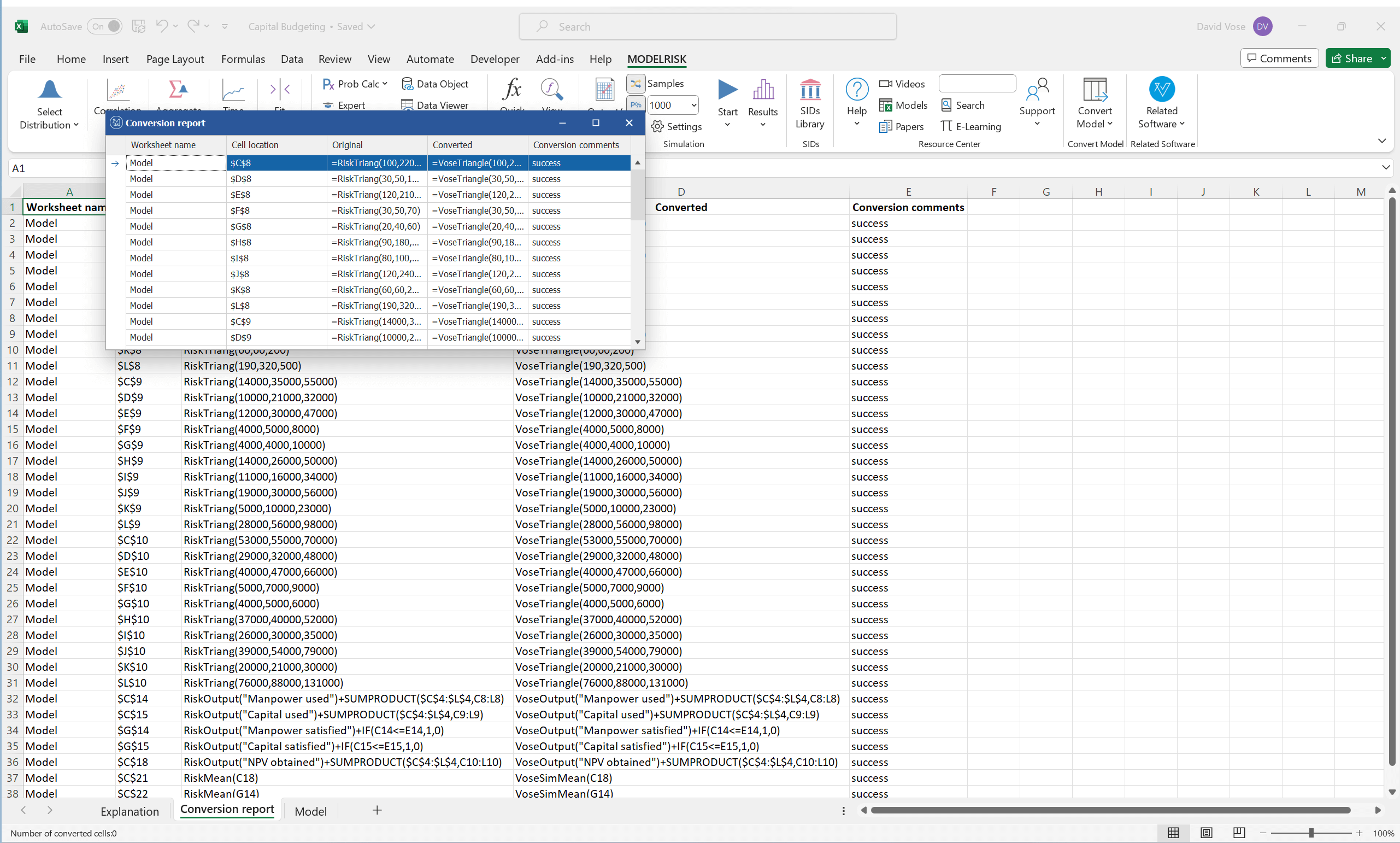
Because the same distributions with the same parameters are being sampled, a converted model is the same model: re-run it and the result distributions match within normal Monte Carlo sampling variation. The practical acceptance test is exactly that — convert two or three production models during the trial, simulate both versions, and put the output distributions side by side. Converted models remain ordinary, readable Excel workbooks with visible formulas: nothing is locked away in a proprietary layer.
What does not convert automatically? The honest list
A switching decision you can be confident in needs the caveats stated as plainly as the benefits. There are three, and each has a defined answer:
1. PrecisionTree models. Decision trees live in a separate Lumivero product, so the @RISK converter does not handle them — ModelChoice does, with a one-click PrecisionTree import of its own. ModelChoice draws and manages the tree directly on the worksheet, re-solves it on every change, and adds analyses PrecisionTree does not offer (robustness, EVPI, multi-criteria).
2. RISKOptimizer models. Stochastic optimisation is the one capability with a genuine timing gap: ModelRisk Optimizer is built and will be released in the near future — contact us about timing and early access. If optimisation is a weekly part of your work, that conversation should happen before you decide; if it is occasional, Analytic Solver covers the interim. Everything else — the simulation core that @RISK is actually used for daily — is covered now.
3. VBA automation. The converter rewrites worksheet formulas, not code. If your workbooks drive @RISK through VBA macros, those calls need rewriting against ModelRisk's API — which supports VBA and C++ calls to its functions, so the workflows can be rebuilt, but plan that as a task rather than a click. For most teams this affects a handful of workbooks at most; the conversion report tells you exactly which.
And the colleague question: if some counterparties stay on @RISK, note that your originals are untouched (the converter works on copies), converted ModelRisk models are readable Excel workbooks anyone can open, and simulation results can be shared through the Results Viewer without the recipient needing a licence.
What do teams report after switching?
We surveyed our switchers informally, and the pattern is consistent. Price was a major motivation for every respondent — but it was rarely the whole story. Most cited dissatisfaction with technical support as a contributing factor (support is a point of deliberate emphasis at Vose Software — test it during your trial and judge for yourself). High-volume users valued the flexibility of ModelRisk's licensing options, where we advise on the least-cost arrangement for your actual usage. In day-to-day work, respondents found ModelRisk easier to use, faster and more stable, and preferred its graphing and reporting; advanced users appreciated the broader toolset.
On speed specifically: in our own 2023 timing test (dated as such in the Top 5 review), ModelRisk ran 10,000 samples of the test model in 28 seconds against 208 seconds for @RISK. Your model on your hardware is the only benchmark that matters, which is one more thing the trial answers directly.
The 10-minute renewal audit
- Pull the invoice. Note the real price per seat per year, and the renewal date.
- Count active seats. Licences provisioned versus people who simulated something this quarter.
- List features used. Ask the modellers; be honest about the edition-exclusive extras — then check each item against the capability map above.
- Price the alternative. Same seat count against the published alternative price; note the gap per year. Our guide to the @RISK alternatives compares the main options side by side.
- Test the converter. Two or three production models through the free trial — convert, re-run, compare the output distributions.
- Decide with the numbers in front of you. Renew, negotiate, or switch — any of the three, but informed.
Step 5 is the one teams skip, and it is the one that converts the audit from a spreadsheet exercise into evidence. A 15-day fully functional trial fits comfortably inside a normal renewal window — and since @RISK is sold as an annual subscription, the months before renewal are the natural moment to run it.
Frequently asked questions
Is ModelRisk cheaper than @RISK?
ModelRisk's published maximum is €1,550 per user per year, against the €2,900 (Professional) and €3,500 (Industrial) per year listed in Lumivero's web shop (retrieved October 2026) — 47–56% less, with volume and duration discounts below the ModelRisk ceiling.
Will I lose any features by switching?
For the simulation work @RISK is used for daily — distributions, simulation, correlation, fitting, time series, reporting — no; ModelRisk covers each area, in most with more depth (136 distributions, copulas, fitting with information criteria, aggregate modelling). The two exceptions are ecosystem products: PrecisionTree (answered by ModelChoice, with one-click import) and RISKOptimizer (ModelRisk Optimizer releases in the near future).
Can I convert my existing @RISK models?
Yes — the free converter handles single models or whole folders in bulk, produces a cell-by-cell conversion report saved inside the workbook, and works on copies so your originals are untouched. The results remain ordinary readable Excel workbooks.
Will my results change after conversion?
A converted model samples the same distributions with the same parameters, so simulation results match within normal Monte Carlo sampling variation. The acceptance test is to re-run both versions and compare the output distributions — ten minutes per model during the trial.
How long does it take a team to become productive?
Most analysts are productive within days: function names mirror @RISK's (RiskNormal becomes VoseNormal), the ribbon can be set to an @RISK-compatible layout during installation or from the Help menu, and worked example models plus in-spreadsheet function descriptions cover the rest.
What if my team uses PrecisionTree or RISKOptimizer?
For decision trees, ModelChoice imports PrecisionTree models with one click and adds robustness, EVPI and multi-criteria analysis. For stochastic optimisation, ModelRisk Optimizer is built and will be released in the near future — contact us about timing and early access; until then Analytic Solver is the main alternative for that specific capability.
What happens when the trial ends?
Nothing is lost: after 15 days the trial reverts to the free Basic edition, and upgrading to Complete later is a licence key, not a reinstallation. Your converted models and your original @RISK files both remain exactly where they were.
When is staying on @RISK the right call?
A perpetual licence that still serves you, weekly RISKOptimizer dependence you cannot bridge, or a renewal negotiation that lands the price where the audit justifies it. The goal is an informed renewal, whichever way it goes.
Articles
Keep reading

ModelRisk
Adding risk and uncertainty to your Excel model
Run the audit's step 5 today: convert a production @RISK model with the free converter, re-run it in the 15-day trial, and compare the results yourself — then decide with evidence.
@RISK, RISKOptimizer and PrecisionTree are trademarks of Lumivero, LLC. Vose Software is not affiliated with Lumivero. @RISK prices are from Lumivero's public web shop (shop.lumivero.com), retrieved October 2026.