
Analytic Solver
Frontline SystemsBest for: Simulation and optimisation from the makers of Excel’s Solver
- Stochastic optimisation
- Simulation speed
- Limited set of functions
- Interface and report design
≈$7,500over 3 years
Read the review ↓
A review by Vose Software, the makers of ModelRisk
We ran ModelRisk, @RISK, Analytic Solver, Oracle Crystal Ball and RiskAMP side by side. Here is how they compare on methods, results, optimisation and price.
For professional risk analysis, ModelRisk gives you the most methods for the money: 136 distributions, 34 time series models and 14 copulas, with the Optimizer and Turbo simulation in every licence, at most €1,550 a year. @RISK is the long-established choice. RiskAMP is the cheapest, for simple models.
Before negotiated discounts. Euro prices (ModelRisk, @RISK) converted at the rate on our price list. Sources and dates
Listed alphabetically. What you may like, and what you may not, from our side-by-side test.
Best for: Simulation and optimisation from the makers of Excel’s Solver
Best for: Teams with a library of existing Crystal Ball models
Best for: Professional risk analysis at a published, moderate price
Best for: Teams with a perpetual licence or many @RISK models
Best for: Learning and simple models on a small budget
For serious work, the real choice is between ModelRisk, @RISK and Analytic Solver. ModelRisk has the most methods in this review and costs at most €1,550 per user per year. Since October 2026, every licence also includes the ModelRisk Optimizer and the Turbo simulation engine.
@RISK has the largest user base. Lumivero’s web shop lists it at €2,900 (Professional) to €3,500 (Industrial) a year, and RISKOptimizer comes only with Industrial. It makes most sense if you hold a perpetual licence or must keep sharing @RISK models. See our @RISK pricing breakdown and the @RISK alternatives.
Analytic Solver suits teams that want simulation and optimisation from the makers of Excel’s Solver. RiskAMP is the cheapest and fine for learning. Oracle still sells Crystal Ball, with a free trial, but its latest update is from August 2024. Our ModelRisk vs Crystal Ball page has the details.
Price sources. 3-year costs are approximate list prices for one user, before negotiated discounts. Analytic Solver Simulation: $2,500 a year on solver.com (retrieved August 2026). @RISK: €2,900 (Professional) and €3,500 (Industrial) a year on Lumivero’s web shop (retrieved October 2026), converted to US dollars at the same rate as ModelRisk’s prices on this site.
Crystal Ball: Oracle offers a free trial and links its prices to the Oracle Store from its Crystal Ball page (retrieved October 2026). RiskAMP Professional: $279 one-time, with renewals at half price, on riskamp.com (retrieved August 2026). ModelRisk: our published price list.
Optimisation finds the decision with the best simulated result, such as which projects to fund or how much stock to hold, while keeping risk within your limits. Every ModelRisk licence now includes it. Here is how you get it in each product.
| Product | Optimiser | How you get it |
|---|---|---|
| ModelRisk | ModelRisk Optimizer | In every licence, at most €1,550 per user per year |
| @RISK | RISKOptimizer | Industrial edition only, €3,500 a year. Professional, at €2,900, doesn’t include it |
| Analytic Solver | Stochastic optimisation, its standout feature | Editions and prices on solver.com |
| Crystal Ball | Decision Optimizer (OptQuest) | An option for Crystal Ball, or the Crystal Ball Suite that combines the two. Prices in the Oracle Store |
| RiskAMP | None | Not offered in the version we tested |
@RISK: Lumivero’s @RISK feature table and web shop, retrieved October 2026. Crystal Ball: oracle.com, retrieved October 2026. RiskAMP: our test.
ModelRisk’s free converters bring @RISK and Crystal Ball models across, RISKOptimizer and Crystal Ball optimisation models included. Converted models stay ordinary Excel workbooks. The whole optimisation can run on the Turbo engine.
How ModelRisk Optimizer worksOur ten optimisation test models come in ModelRisk, @RISK and Crystal Ball versions, ready to run. Try them in each product’s trial and compare the answers on your own PC.
Download the test modelsSwitch Turbo on and models often run many times faster than on ModelRisk’s classic engine. ModelRisk analyses the workbook once, compiles only the cells that change between iterations and runs them on every processor core, without Excel recalculating. Turbo is included in every ModelRisk licence.
Press Run both to start the two engines together.
Simulation phase only: 89 models from our internal test library, same workbook, 1,000 iterations, Turbo against ModelRisk’s classic engine. Excludes the one-time model analysis and opening the workbook. The gain depends on the model’s structure. How Turbo works
A spreadsheet model of costs, NPV or sales usually gives one number, with no sense of how far off it could be. A risk analysis add-in replaces the uncertain inputs with probability distributions and recalculates the model thousands of times. You then see the range of outcomes and how likely each one is. That is Monte Carlo simulation.
Our guide to Monte Carlo simulation explains the method. You can also run a simple simulation in Excel with no add-in: our step-by-step guide shows how, and where an add-in starts to pay for itself. If you are still mapping the wider category, start with our overview of risk analysis software.
For this review we installed all five add-ins and put the same models and data through each. The feature counts and checks on this page come from that test. Prices come from each vendor’s website.

Start with what your models need. These are the thirteen things we would check before paying for any of these tools.
If you are just adding up costs, any add-in will do. An engineer who needs Weibull distributions, or an analyst fitting log-normals, needs software that has them. The same goes for correlation and time series: check the tool supports what you need before you buy.
If you need to choose decisions as well as measure risk, such as which projects to fund, you need optimisation under uncertainty. Check whether it is in the licence or in a dearer edition.
Speed matters for big models, for tail probabilities that need hundreds of thousands of samples, and for optimisation, which runs many simulations back to back. Time one of your own models in each trial.
AI assistants now work inside some of these tools. The useful kind is connected to the add-in: it reads your actual model and leaves the maths to the simulation engine, so you don’t retype advice from a chat window. Check what it can do with your model and what it costs. The comparison table lists each product’s option.
Some models need more than basic distributions. Convolution (summing distributions in one cell), extreme values and reverse convolution save you from awkward workarounds. Not every add-in offers them.
You will spend a lot of time looking at distribution plots and results windows. At minimum you want clear charts of each distribution. Sliders that let you explore probabilities on the fly make a real difference day to day.
All five products use the Mersenne Twister generator, the industry standard. What matters more is seed control, so you can reproduce a run, and a way to find the scenario behind a rare outcome.
If your organisation already uses one tool, there is a pull to stay with it. Switching can still save a lot across a large team, and model converters make the move easier.
Excel updates break add-ins more often than you would expect, and IT policies can block installs. Before you buy, send each vendor’s support team a question and see how quickly and how well they answer.
Good example models save hours of trial and error. Some vendors also offer courses, consulting or training, which helps if your team is new to quantitative risk analysis.
Your results will end up in a report or a slide. Tools that export charts and tables directly, and rebuild them when the inputs change, save a lot of copying and pasting.
Most of these products offer a free trial, typically 15 days: enough to build a test model and see how the tool feels. When ModelRisk’s trial ends, it drops to a free basic edition rather than stopping.
Prices vary enormously. The comparison table shows what you pay over one, two and three years, and the methods you get for each $1,000.
Listed alphabetically. Each review covers what the product is, what it costs and where it falls short. On a phone, swipe each ribbon to see all of it.

Analytic Solver, from Frontline Systems, combines Monte Carlo simulation with optimisation. Its standout feature is stochastic optimisation: you choose the decision cells and the tool optimises against simulated outputs, such as risk-adjusted profit.
The simulation engine is fast, since Frontline knows Excel’s calculation engine inside out. It also offers AI-driven assistance and web publishing, though its Monte Carlo feature set is narrower than some competitors’.

Crystal Ball was one of the first Monte Carlo tools for spreadsheets. Decisioneering built it, and Oracle sells it today. Instead of putting distribution functions in cells, Crystal Ball keeps each assumption’s distribution in its own data and enters a value into the cell on every trial.
Oracle offers a free trial and four editions: Crystal Ball, the Decision Optimizer option, the Suite that combines the two, and a Classroom Edition. Its downloads page lists release 11.1.3.0.0, from May 2022. The latest update in Oracle’s compatibility matrix, 11.1.3.0.100, is from August 2024. For a full comparison, see ModelRisk vs Oracle Crystal Ball.

ModelRisk was built to fill the gaps left by earlier tools. It brought time series, copulas and thorough distribution fitting to risk analysis in Excel. It has the largest function library in this review: 136 distributions, 34 time series models, 14 copulas and over 1,400 functions.
Since October 2026, every licence includes the ModelRisk Optimizer and the Turbo simulation engine. Results open in the Results Viewer window, where you arrange charts and tables in tabs and export them to Excel, Word, PowerPoint or PDF. With the free ModelRisk MCP, an AI assistant such as Claude can build, run and explain a model in the live workbook.

@RISK (pronounced “at risk”) is the Monte Carlo add-in for Excel sold by Lumivero, formerly Palisade. It adds distributions, simulation, sensitivity charts and reports to Excel, and it has a large, long-established user base. Lumivero’s web shop lists it at €2,900 (Professional) to €3,500 (Industrial) a year. RISKOptimizer comes only with Industrial.
It covers much of the same ground as ModelRisk, without some of the more specialised functions. The sticking point is price: @RISK Industrial costs more than twice ModelRisk’s €1,550 maximum. If you are weighing up a switch, read our guide to switching from @RISK.

RiskAMP is a low-cost Monte Carlo add-in for Excel from Structured Data. It costs $279 one-time for the Professional edition, with a year of updates, or $19 a month on subscription (riskamp.com, retrieved August 2026).
It is the cheapest option by a wide margin, and fine for learning the basics. The feature set is minimal and the interface bare, so it isn’t really built for professional work. You outgrow it when you need more than one correlation model, time series or distribution fitting.
Fitting is a good test of a product’s technical depth and its interface. We fed the same data set into the four tools that fit distributions (RiskAMP doesn’t). Three things to watch for:
Some tools will fit a Uniform distribution to your data, taking the smallest and largest values seen as its limits. That says the variable can never fall outside what you have already observed, a risky assumption with small samples.
Fit a Normal to three data points and its mean and standard deviation jump around when you add a fourth. With fifty points they barely move. Simulating that parameter uncertainty keeps a model honest.
A four-parameter distribution always fits data better than a two-parameter one, because it is more flexible. Information criteria such as AIC correct for that, where older goodness-of-fit tests don’t.
Analytic Solver’s fitting works well, but the fitted function can’t refer to the source data. If your data changes, you fit again by hand. It also leaves parameter uncertainty out of the model.

Crystal Ball still ranks fits with older goodness-of-fit tests (Anderson-Darling, Chi-squared) rather than information criteria. In our test this put a four-parameter Beta above the Normal that actually generated the data, a classic case of overfitting. Like Analytic Solver, it can’t link the fit to the data and ignores parameter uncertainty.

ModelRisk ranks fits by information criteria (SIC, HQIC and AIC). The fitted function can refer to the source data, so the model updates when the data changes. It is the only tool here that carries parameter uncertainty into the simulation itself, shown as the spread of fitted lines. A Normal fitted to the data looks like this:
=VoseNormalFit(C3:C423)
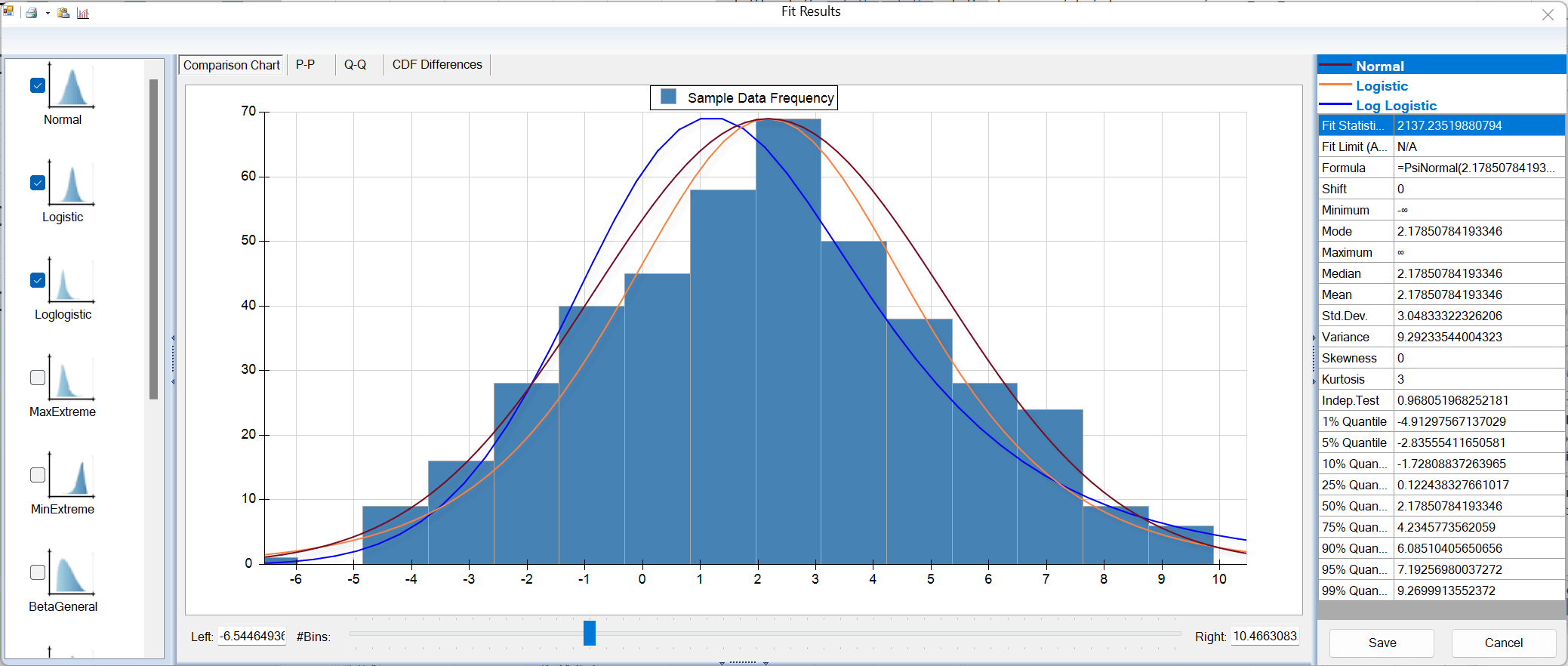
@RISK’s fitting is decent, though it doesn’t apply its criteria the same way to every distribution (note the Uniform result). It can refer to the source data. Parameter uncertainty appears in the fitting window but isn’t carried into the simulation, and the mode it shows has no real statistical meaning. A fitted Normal looks like this:
=RiskNormal(2.1785,3.052,RiskFit("Dataset 2","AIC"),RiskName("Dataset 2"))How you view and share results varies a lot between products. Here is what each one shows after a simulation run. RiskAMP’s results tools are minimal, so it isn’t shown.

After a simulation, Analytic Solver shows small charts for each input and output cell. Click one to open a full-size chart you can edit. Tip: turn off the default 3D effect, which makes the charts harder to read.

Crystal Ball opens a swarm of pop-up charts when the simulation finishes. They look reasonable, but managing dozens of floating windows, and working out which output is which, soon gets tiring.

ModelRisk’s Results Viewer window stays open during the simulation and updates live. Set up tabs of charts and tables, arrange them as you like, and export them to Excel, Word, PowerPoint or PDF. The settings are saved in the workbook, so your charts come back on the next run.
Colleagues without ModelRisk can open a copy made with the SWAP tool, where each ModelRisk function becomes a fixed, annotated value. Our sensitivity analysis guide shows how its tornado and spider charts rank the inputs.

@RISK shows a live chart during the simulation, and you can flip between outputs with Alt+right arrow. Small icons switch the graph type. Afterwards you reach results through the Reports menu, which takes several clicks. For several charts side by side you juggle separate windows, which is awkward with large models.
Decision trees map a sequence of decisions and chance events as a branching diagram. They are the right tool when the question is a series of choices, such as invest or wait, test or launch. Analytic Solver includes decision trees in its Simulation edition. @RISK users get PrecisionTree, which Lumivero now sells only inside its DecisionTools Suite.

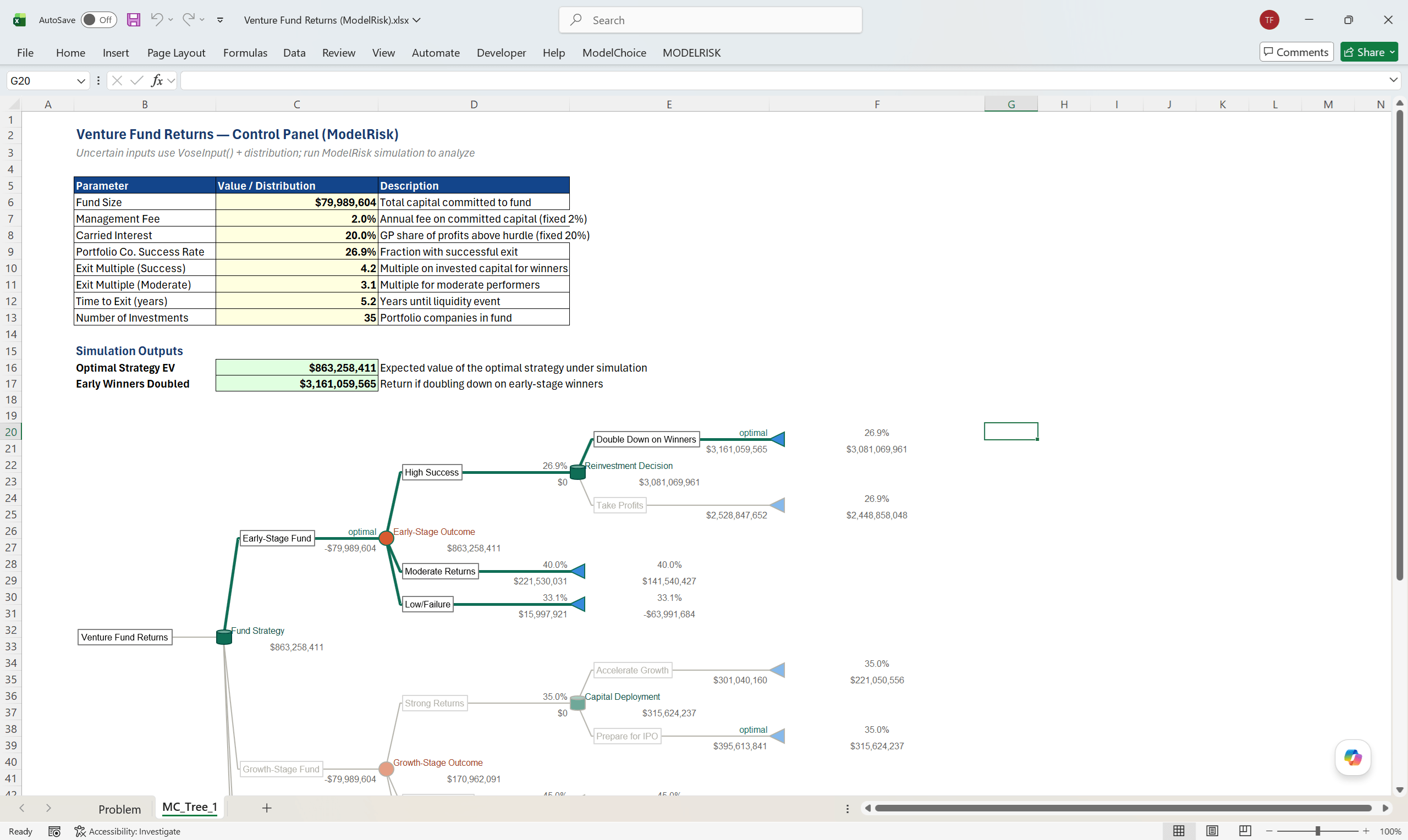
Vose Software’s ModelChoice add-in rolls the tree back automatically and adds the analyses that make a tree defensible: sensitivity, risk profile, robustness, value of information (EVPI) and multi-criteria scoring. It imports PrecisionTree models with one click.
ModelChoice pairs naturally with ModelRisk: the tree for the decision structure, simulation for the uncertainty inside each branch. We compare seven decision-analysis tools, PrecisionTree, DPL, Analytica and TreeAge among them, in the top 7 decision analysis tools.
The checks come from our test of each product, on the versions listed. ModelRisk is the October 2026 release. Prices are list prices from each vendor’s website (note 8).
| Product | Analytic Solver | Crystal Ball | ModelRisk | @RISK Industrial | RiskAMP |
|---|---|---|---|---|---|
| Version tested | 2023 Q3 | 11.1.3 | October 2026 release | 8.1.1 | 5.16 |
| Cost, US dollars, list price for one user 8 | |||||
| 1 year | 2,500 | Oracle Store9 | 1,850 | 4,180 | 279 |
| 2 years | 5,000 | Oracle Store9 | 3,700 | 8,370 | 420 |
| 3 years | 7,500 | Oracle Store9 | 5,560 | 12,550 | 560 |
| Feature counts, from our test | |||||
| Unique distributions | 47 | 22 | 136 | 56 | 65 |
| Extra reparameterised distributions | 0 | 0 | 12 | 48 | 0 |
| Correlation models (copulas) | 6 | 1 | 14 | 6 | 1 |
| Time series models | 0 | 1 | 34 | 13 | 0 |
| Functions (approx.) | 270 | 35 | 1,435 | 250 | 105 |
| Languages other than English | 0 | 0 | 6 | 1 | 0 |
| Value for money | |||||
| Distributions per $1,000 (3-year cost) | 6 | n/a9 | 24 | 4 | 116 |
| Functions per $1,000 (3-year cost) | 36 | n/a9 | 258 | 20 | 188 |
| General | |||||
| AI support14 | AI Agent | 14 | ModelRisk MCP | @RISK Agent (beta) | 14 |
| Follows Excel add-in rules | Mostly | ||||
| Function swap | |||||
| Cloud deployment possible | |||||
| Interface adapts to your usage1 | |||||
| Simulation | |||||
| Monte Carlo simulation | |||||
| Fast simulation mode13 | PSI Interpreter | 13 | Turbo | Multi-core | Fast mode |
| Multiple simulation runs for scenarios | |||||
| Run macros during simulation | |||||
| VBA and C++ functionality | |||||
| Control of precision of results | |||||
| Demo mode | |||||
| Independent streams for variables | |||||
| Recall sample in model | |||||
| Normal(3,0)=32 | |||||
| Convolution tool | |||||
| Reverse convolution tool | |||||
| Interface | |||||
| Graphical interfaces | |||||
| One click opens the relevant interface | |||||
| Help file integration | |||||
| Functions return informative messages | |||||
| Fitting | |||||
| Distribution fitting | |||||
| Correlation fitting | |||||
| Time series fitting | Mostly | ||||
| Modern (information criteria) fit statistics | |||||
| Link fitted model to data | |||||
| Parameter uncertainty simulated | |||||
| Simulation results | |||||
| Results in an interactive window | |||||
| Histogram and cumulative plots | |||||
| Box, scatter and trend plots | |||||
| Single window for results | |||||
| Export to | Excel | Excel, Word, PowerPoint, PDF | Excel, PDF | Excel | |
| Share results with people who don’t have the add-in | 3 | 4 | |||
| Six Sigma statistics | |||||
| Related tools | |||||
| Stochastic optimisation | Option6 | 10 | 12 | ||
| Decision trees | 11 | 5 | |||
| Data interrogation | 7 | ||||
| Stochastic numerical integration | |||||
| Stochastic differential modelling | |||||
| Extreme value modelling | |||||
| Model converters for | @RISK | @RISK, Crystal Ball | Crystal Ball | ||
Green marks the best figure in a row and red the weakest.
It depends on your needs. ModelRisk offers the widest technical feature set in this review (136 distributions, 34 time series models, 14 copulas and over 1,400 functions) at a published price, and every licence includes the Optimizer and Turbo simulation. That makes it the best value overall.
Analytic Solver is a strong choice if you want simulation and optimisation from the makers of Excel’s Solver, and RiskAMP is the cheapest option for basic Monte Carlo work.
Published list prices: RiskAMP Professional $279 one-time (riskamp.com, August 2026); Analytic Solver Simulation $2,500 a year (solver.com, August 2026); @RISK €2,900 (Professional) to €3,500 (Industrial) a year on Lumivero’s web shop (October 2026). ModelRisk costs at most €1,550 per user per year, with the Optimizer and Turbo included; see our price list. Oracle lists Crystal Ball prices in the Oracle Store, linked from its Crystal Ball page.
Oracle still sells Crystal Ball, offers a free trial and links its prices to the Oracle Store. Its downloads page lists release 11.1.3.0.0 from May 2022, and the latest update in Oracle’s compatibility matrix is from August 2024. In our test it had the smallest feature set in this review (22 distributions and around 35 functions), and it is not a native Excel add-in.
If you are choosing today, compare it with the alternatives first: see ModelRisk vs Oracle Crystal Ball.
RiskAMP, at $279 one-time for the Professional edition or $19 a month on subscription (riskamp.com, retrieved August 2026). It covers basic Monte Carlo simulation, but its feature set is minimal and its results tools are limited, so it suits learning and simple models rather than professional risk analysis.
ModelRisk includes free converters for both @RISK and Crystal Ball models, the only product in this review that converts both. They bring optimisation models across too, from RISKOptimizer and from Crystal Ball. Analytic Solver converts @RISK models, and @RISK converts Crystal Ball models. Converted ModelRisk models stay ordinary, readable Excel workbooks.
Analytic Solver includes decision trees in its Simulation edition. PrecisionTree is no longer sold on its own: Lumivero’s shop lists it only inside the DecisionTools Suite, at €3,680 to €4,790 a year (retrieved October 2026). Vose Software offers ModelChoice, a decision-analysis add-in that draws trees on the worksheet, rolls them back automatically, and adds EVPI, robustness and multi-criteria analysis, with one-click import of PrecisionTree models. Crystal Ball and RiskAMP don’t offer decision trees.
We compare decision-analysis tools in the top 7 decision analysis tools.
Yes. ModelRisk Optimizer, included in every ModelRisk licence, searches for the decisions that give the best simulated result, such as the highest mean NPV with at most a 10% chance of a loss. The converters bring RISKOptimizer and Crystal Ball optimisation models across, and the optimisation can run on the Turbo engine.
Across 89 models from our internal test library, Turbo’s simulation phase ran a median of about 200 times faster than ModelRisk’s classic engine, and two in three of them more than 100 times faster (same workbook, 1,000 iterations, excluding the one-time model analysis and opening the workbook). The gain depends on the model.
Turbo is in every ModelRisk licence. We don’t publish timings for other add-ins, so time one of your own models in each product’s trial.
Three of the five connect an AI assistant to the add-in. ModelRisk MCP is free and open source: Claude and other MCP assistants build, fit, simulate and read a ModelRisk model in the live workbook, and every number comes from ModelRisk.
Lumivero’s @RISK Agent, in beta, connects Claude to @RISK at no extra cost, using your own AI model. Analytic Solver has an AI Agent in its task pane. We found no AI feature for Crystal Ball or RiskAMP (October 2026).
Download the free 15-day trial, fully functional with the Optimizer, Turbo and both converters. If you’d rather see it first, we’ll walk you through it on a call.
Share this review on LinkedIn@RISK, RISKOptimizer and PrecisionTree are trademarks of Lumivero, LLC. Oracle and Crystal Ball are registered trademarks of Oracle and/or its affiliates. OptQuest is a trademark of OptTek Systems, Inc. Analytic Solver is a trademark of Frontline Systems, Inc. RiskAMP is a trademark of Structured Data, LLC. Vose Software is not affiliated with these vendors. Third-party prices and details are quoted from the named public sources, with the dates shown, and may change.